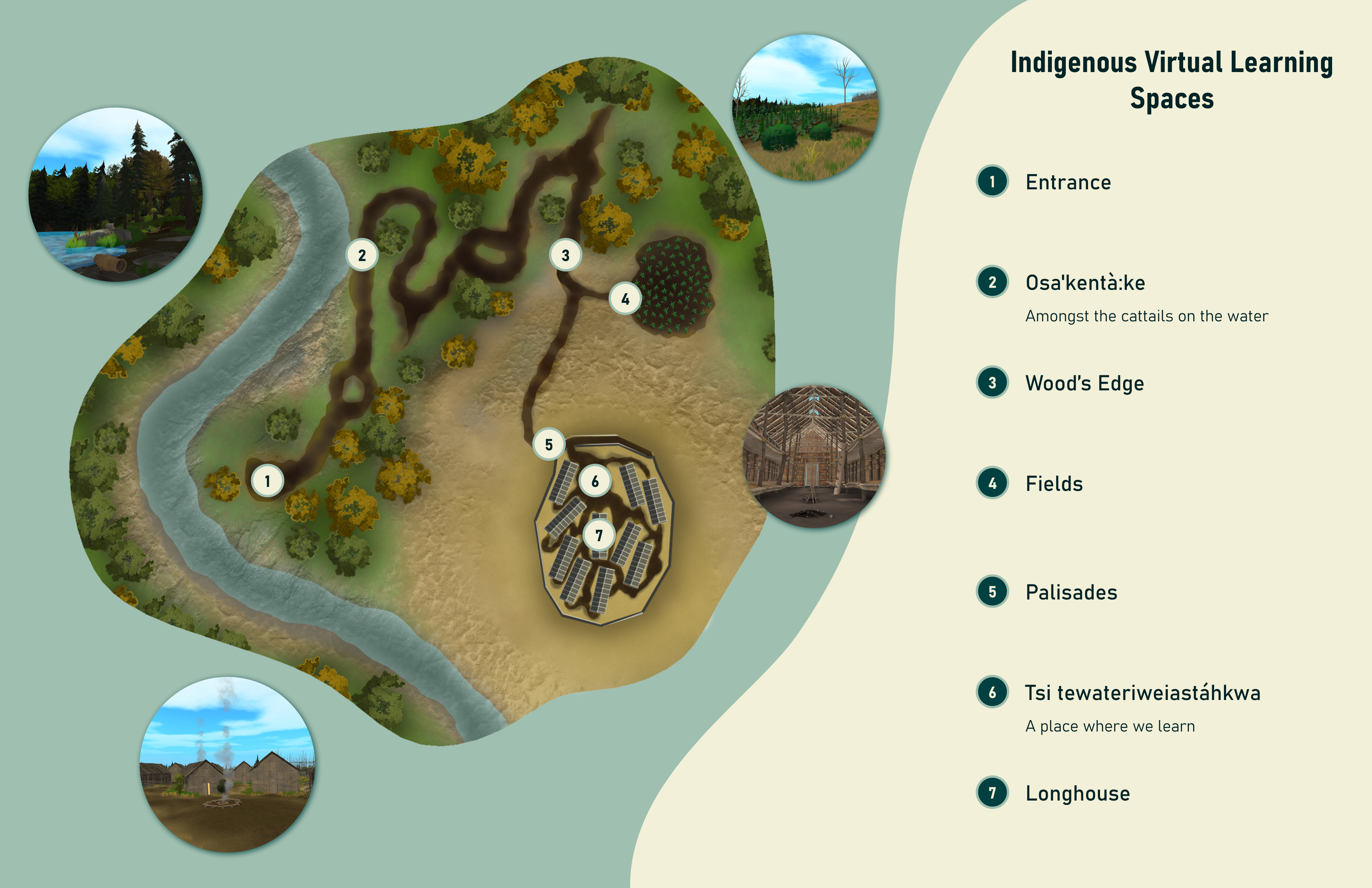
Map of the final environment, showing the seven areas of interest for users to explore.
An immersive, multi-user VR environment for storytelling and education.
Video compilation showing POV from inside a headset, and a group walking through the final experience.
Toolkit
Overview
Create a multi-user VR environment that could be used for class discussions and storytelling. The priority was for users to feel connected to and fully immersed in the world around them.
Research
Before jumping into the design, I led brainstorming sessions externally with the client to identify the needs of the application, as well as brainstorming and planning sessions with the internal team to ideate solutions to those needs, in the form of functionality.
How do we bring together a group of students to learn in a shared virtual environment?
It was important that the application could be used for classes across a variety of disciplines, and offer an opportunity for discussion on a wide variety of topics. For this reason, the decision was made to have no story or narrative, and instead focus efforts on functionality for sending live microphone audio from the Guide to the other headsets in the group.
The core of the application was to feel connected to the environment and world around you to to enhance understanding when discussing traditional ways of life. To prioritize this, we opted for minimal user interfaces, and focused on interactions directly in the space.
Objects of interest should be placed naturally, to combat the feeling of walking through an exhibit. We landed on four distinct areas to explore and find interactive objects: the forest, the farming fields, the village, and the Longhouse.
Map of the final environment, showing the seven areas of interest for users to explore.
Design Process
Throughout the development process, the prototype was tested at would would become it's final home in Carleton University's Experiential Learning Hub. Through these sessions, we were able to hear from educators, using their feedback to shape the final product into something they would be excited to include in their courses.
Users were finding it easy to get turned around in the forest, even with a map. To assist, we added curved "Direction Trees", which are at home in the environment, while also acting as a wayfinding tool. Those in the Guide role were also referring back to their map more frequently than expected. Adding the ability to keep the map open eased the constant opening and closing of the menu.
In situations with larger groups, participants were split betwwen two rooms. Those in the room with the Guide preferred the Guide's microphone to not come through their headset, as any delay in the voice was distracting. Those in the room without the Guide needed to hear their microphone through the headset. In this case, no matter our default setting, one group has more of a learning curve to figure out where to find the audio settings. To resolve this, an extra UI element was added at the load-in point, where users were asked to select their sound preference as soon as they connected.
Originally, we speculated it might be most effective to have participants only able to see the guide, and not the rest of the group. We found that participants greatly enjoyed seeing each other in the space, and found all manner of interesting ways to communicate non-verbally, and overall the sense of togetherness with the group was preferred over a more isolated experience.
Although participants could see each other in the space, it was often unclear exactly what the guide was referencing. To assist, we added a familiar laser pointer tool for the Guide to be able to point to elements in the environment and focus attention in one direction.
Interactive objects labelled with their Indigenous names were a point of stress for educators planning to act as the Guide for the class, due to fear of mispronunciation. Audio recordings added to play the pronunciations made educators feel more comfortable leading the group through the space.
Solution
The final application was successful in it's original goal to bring a class together, immerse them in a new environment, and offer a unique experience catered to storytelling and teaching. It has been included in course content for multiple classes so far, with positive feedback from both students and educators.
Reflection
Testing with educators and students who were not related to the project offered extremely valuable feedback, but we were not able to set up the sessions until later in development. Consulting with these groups throughout the early stages of the project may have offered insight that would have seen functionality take shape slightly differently to accomodate a wider range of situations.